

OpenAPI scope
OpenAPI test generation currently lists OpenAPI 3.0.x in JSON or YAML. Other specification versions or formats are not claimed on the pricing page.
Turn an OpenAPI specification and the test assets you already maintain into repeatable API test pipelines. Keep scripts with your engineering workflow, trigger the right checks during delivery, and inspect one run from input to result.

For backend engineering teams
Backend teams often maintain specifications, test scripts, credentials, data, and delivery jobs in different places. Testany brings those assets into an orchestrated test pipeline: start from OpenAPI 3.0.x or existing scripts, pass outputs between cases, choose a trigger, and run in the environment supported by your edition.
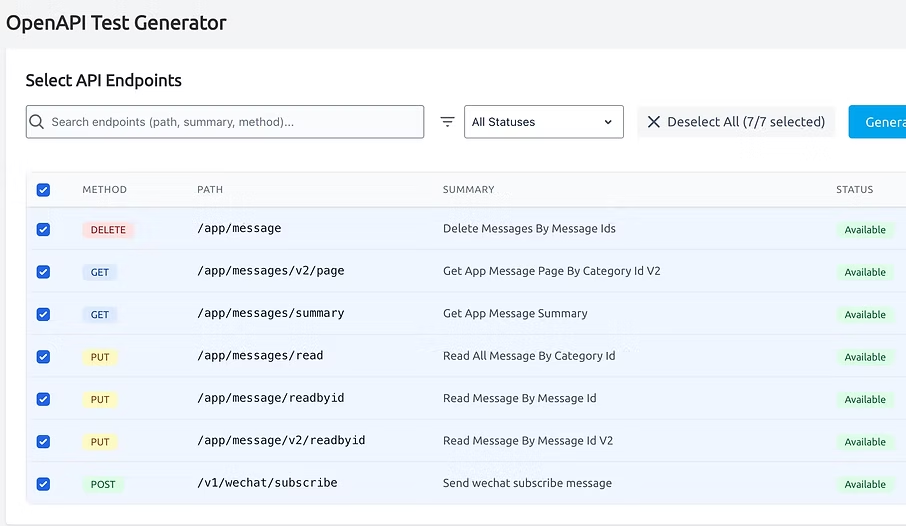
Use an OpenAPI 3.0.x JSON or YAML specification to generate API test scripts, including boundary and error scenarios. Treat the generated scripts as reviewable test assets, then keep their coverage aligned with the API contract your team ships.
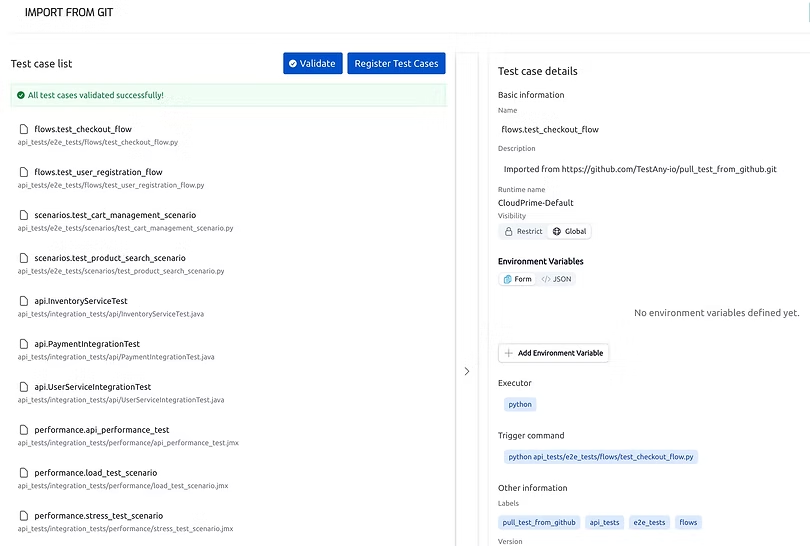
Manage test scripts from supported sources instead of copying them into an isolated testing project. The current edition comparison lists Local, GitHub, and Bitbucket sources, so teams can select the source and operating model that fits their repository workflow.
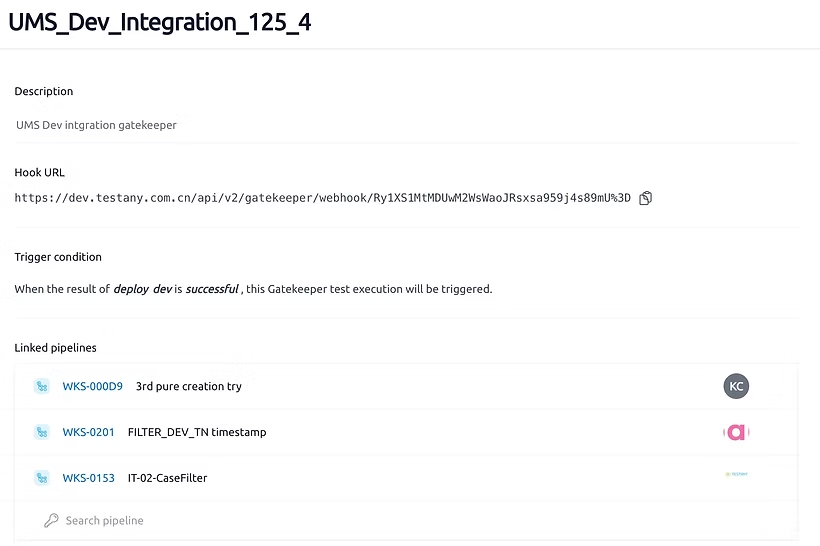
Orchestrate cases in a pipeline and run them manually, on a schedule, or from an event. Relay values across cases for multi-step API journeys, then route the result through the notification channels available in your edition.
A practical workflow
The workflow stays explicit, so the source specification, reviewed scripts, runtime, and release decision remain visible to the engineering team.
Provide an OpenAPI 3.0.x specification in JSON or YAML, or begin with scripts already maintained in a supported source.
Inspect generated and existing cases, select the scenarios that matter, and keep credentials out of the scripts through the supported credential options.
Order cases in a test pipeline and use Relay Cases when one response must supply data to a later request.
Run manually, by schedule, or from an event; review the result and connect the outcome to the delivery rule owned by your team.
Case-study evidence
The published case describes a 12-developer API team in three locations using Gatekeeper, Testany Secrets Service, and a private Trusted Runtime for multi-environment, long-chain journey and regression tests.
These figures are reported by one anonymized case study. They describe that team and environment; they are not a guarantee of results for every deployment.
Read the API team case studyPlan the rollout
The public edition comparison defines the capabilities below. Use it as the current purchasing reference and confirm environment-specific requirements during a demo.
OpenAPI test generation currently lists OpenAPI 3.0.x in JSON or YAML. Other specification versions or formats are not claimed on the pricing page.
Listed frameworks include Pytest, Python UnitTest, Robot Framework, Postman, Maven, Gradle, JMeter, and JUnit. Script sources are Local, GitHub, and Bitbucket.
Deployment model, execution runtime, pipeline concurrency, and support levels vary by edition. The comparison also lists managed credential storage and bring-your-own options; confirm the credential configuration for your edition. One credit represents one test pipeline execution.
Backend team FAQ
The current feature comparison lists OpenAPI 3.0.x specifications in JSON and YAML. If your API uses another version or specification format, confirm a conversion or integration path before rollout.
Yes, the current script-management options list GitHub and Bitbucket as well as Local sources. Repository permissions, branch rules, and the exact synchronization workflow should be validated for your environment.
No such claim is made. Generation reduces initial authoring work, while the engineering team still owns the API contract, scenario selection, assertions, and review of the test assets used as a delivery gate.
The edition comparison lists a local self-managed runtime and dedicated deployment for Enterprise. Community and Commercial use the shared managed model, so check the edition table before designing network access.
Continue evaluating
Review the team profile, deployed Testany components, workflow, and reported results behind the figures on this page.
Compare credits, concurrency, framework support, deployment, credentials, notifications, and support.
Use the product documentation when you are ready to validate configuration and implementation details.